A touch screen monitor for business is rarely a standalone purchase. It sits inside a checkout counter, a factory control cabinet, a meeting room wall, or a self-service station, and it has to keep working through long shifts, constant touching, and unpredictable environments. Buying the wrong unit is expensive in ways the invoice never shows: downtime, failed deployments, and replacement cycles that arrive two years early.
This guide walks through the 12 factors B2B buyers should compare before placing an order, from panel grade and touch technology to power delivery, compliance, and vendor support. Each factor includes the specific questions to ask a supplier, so procurement teams and AV/IT integrators can turn a spec sheet into a defensible purchase decision. If you are new to the category, start with our primer on what a touch screen monitor is and how it works.
Key Takeaways
- Commercial deployments fail on durability and integration, not on screen sharpness — grade the panel, enclosure, and power design before anything else.
- Match touch technology to the environment: projected capacitive for most business uses, resistive where gloves or liquids are involved.
- Confirm 24/7 عملية, hardware watchdog recovery, and IP-rated front panels for unattended or harsh locations.
- Plan the computing platform (أندرويد, ويندوز, or Linux) around your software stack, not the other way around.
- Compare suppliers on engineering support, certification coverage, lead times, and warranty terms — unit price is only one line in total cost of ownership.
Factor 1–2: Deployment Environment and Installation Format
Every selection decision starts with one question: where will the monitor live, and how will it be mounted? A countertop POS terminal, a wall-mounted room panel, an open-frame unit built into a kiosk enclosure, and a floor-standing self-service display share almost no mounting hardware. The physical format dictates the enclosure, the cable routing, and even the thermal design.
Walk the installation site before you shortlist hardware. Measure the mounting surface, check wall construction, count the available power and network drops, and confirm whether cabling can be concealed. For wall installations, verify VESA hole patterns and whether the bracket ships with the unit. Monitors deployed in public corridors need anti-theft mounting; units in food service need wipe-clean surfaces.
Businesses that skip this step end up paying fabricators to adapt cabinets around an off-the-shelf screen. If your project spans multiple form factors, look for a supplier whose product line covers desktop, مثبتة على الحائط, إطار مفتوح, and kiosk formats on a shared platform — our overview of the types of touch screen monitors for business explains where each format fits.
Factor 3: Panel Grade and Display Quality
Not every LCD panel leaving a factory is equal. Commercial-grade monitors should specify an A-grade panel with IPS (in-plane switching) technology as the default, because IPS delivers consistent color and viewing angles when customers view the screen off-axis — a daily reality at counters and kiosks. Lower-grade panels drift toward yellow or show brightness falloff within a year of continuous use, a failure mode buyers rarely see in a demo unit.
Ask suppliers three questions about the panel: is it new A-grade stock, what is the rated brightness in nits, and what is the guaranteed luminance retention over continuous operation? For bright environments such as storefront windows or sunlit lobbies, look for high-brightness options of 1000 nits or more, and ask whether anti-glare (اي جي) glass or anti-fingerprint (AF) coatings are available. These options materially change readability and cleaning frequency in public spaces.
Factor 4: Screen Size and Resolution
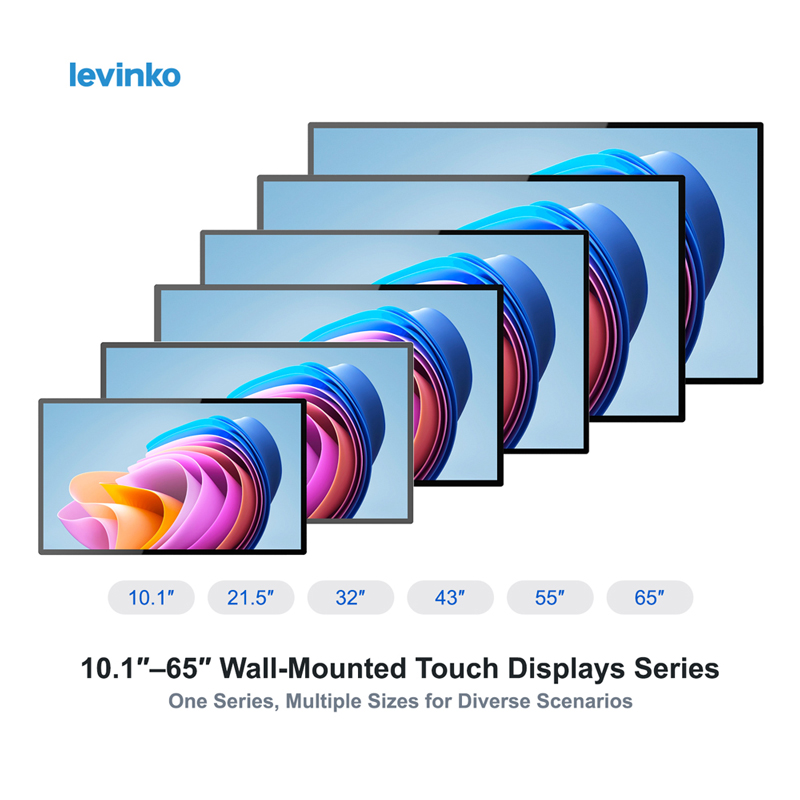
Size follows the interaction distance. Operators touch a POS screen from arm’s length, so 10.1-inch and 15.6-inch formats dominate point of sale. Customers standing at a kiosk interact from a greater distance, which is why 21.5-inch and larger screens anchor self-service. Room scheduling panels mounted beside a door work best at 10.1 بوصة; informational signage viewed across a lobby scales up from 32 ل 55 بوصة.
Match resolution to viewing distance rather than chasing pixel density. Full HD (1920 × 1080) is the commercial standard for 10.1 ل 27 بوصة; larger formats justify higher resolutions when content includes fine text. One practical rule: if your application renders small buttons or dense tables, test the actual UI on the physical size before committing — a layout readable on a 27-inch desktop monitor can fail usability on a 10.1-inch panel.
Factor 5: Touch Technology
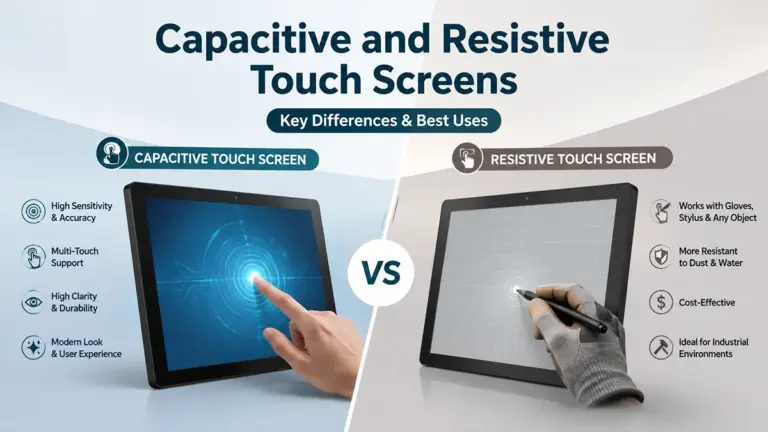
Most commercial monitors use either projected capacitive (PCAP) or resistive touch. PCAP — the technology in modern smartphones — supports multi-touch, optical clarity, and tough cover glass, which makes it the default for retail, ضيافة, and corporate deployments. Resistive touch responds to pressure, works with gloves and styluses, and tolerates water on the surface, which keeps it relevant in kitchens, laboratories, and light industrial settings. Our detailed comparison of capacitive versus resistive touch screen monitors breaks down the trade-offs.
For public-facing units, specify the touch points you need (10-point PCAP covers standard gestures), and confirm the cover glass specification — tempered glass with a stated thickness — because cover glass is the component that absorbs daily abuse. Ask whether the touch controller maintains accuracy after power cycles and whether the supplier provides a calibration tool for field service.
Factor 6: Operating System and Computing Platform
A business touch monitor is either a touch display (you supply the computing) or an all-in-one touch computer (أندرويد, ويندوز, or Linux is built in). All-in-one platforms reduce cabling and boot straight into your application — a significant advantage for kiosks and room panels. Android hardware built on mainstream SoCs such as Rockchip RK3566/RK3568 boards is common for content, الطلب, and room-booking apps; Windows platforms (Intel Core i3/i5/i7, or power-efficient Celeron and N-series processors) remain the safe choice for legacy POS software and hardware peripherals that need Windows drivers.
One integration constraint deserves early attention: web-based POS software on Android often cannot drive receipt printers, an industry-wide limitation. If your stack is browser-based and depends on printers, validate printing on Android hardware first or choose a Windows unit. For fleet deployments, confirm that the OS supports kiosk mode — locking the device to a single application at boot — and ask whether the supplier pre-configures it at the factory.
Factor 7: Performance Headroom
Specify compute for the software you will run in year three, not the demo you run today. Kiosk and digital menu applications accumulate features — analytics, camera-based modules, richer animations — and a platform sized exactly to the current build will not age well. Compare processor tier, memory ceiling, and storage (and whether storage is expandable). If your roadmap includes peripherals or sensors, ask what interfaces exist on the mainboard today, because retrofitting hardware support after deployment is costly.
Factor 8: Connectivity and Integration Interfaces
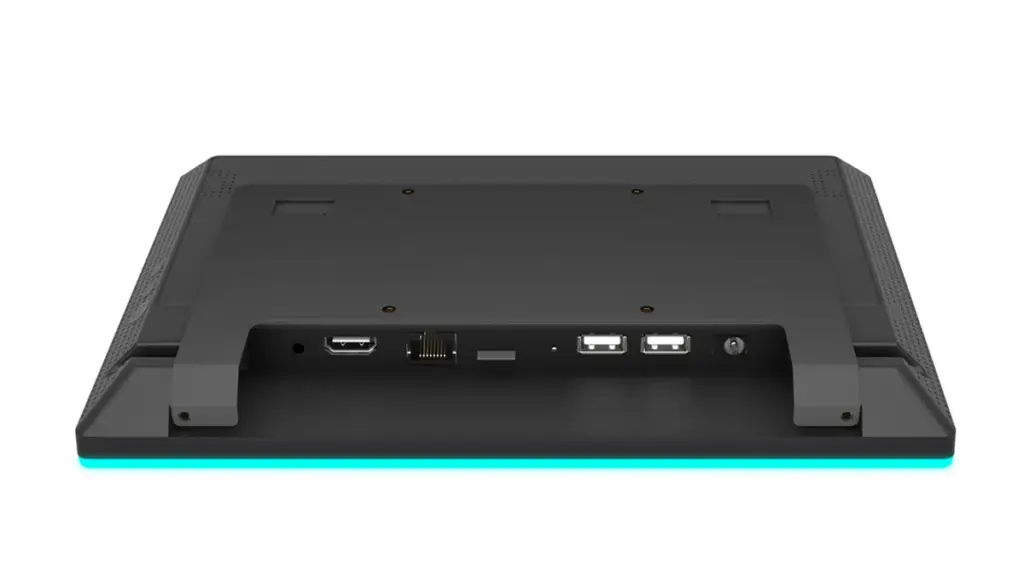
Commercial installations live or die by their ports. Beyond HDMI, USB, and Ethernet, business deployments frequently need serial interfaces (RS232, RS485) to talk to payment devices, scanners, and printers, plus GPIO or relay outputs to drive door strikes, lights, and other peripherals. NFC/RFID readers enable access control and tap-to-pair interactions. الطاقة عبر إيثرنت (PoE) deserves special attention for wall-mounted panels: a single cable carrying both power and data dramatically reduces installation cost and removes visible power supplies.
Ask for the interface map before ordering, and check Wi-Fi and Bluetooth versions for wireless deployments. If you manage a fleet, ask whether the supplier exposes a documented API or SDK for the hardware layer — controlling LEDs, reading NFC tags, or triggering peripherals programmatically. A unified API across a supplier’s product line means your software team writes integration code once and reuses it across every screen size you deploy, which is the approach we take with our software and system integration support.
Factor 9: Reliability Engineering for Continuous Operation
Commercial monitors are expected to run for long hours — often around the clock. Three reliability features separate commercial hardware from consumer displays: rated 24/7 عملية, a hardware watchdog that detects a frozen system and forces a restart automatically, and industrial-grade thermal design that manages heat without fans collecting dust. A watchdog recovery in under a minute is the difference between a kiosk that self-heals overnight and one that greets morning customers with a frozen screen.
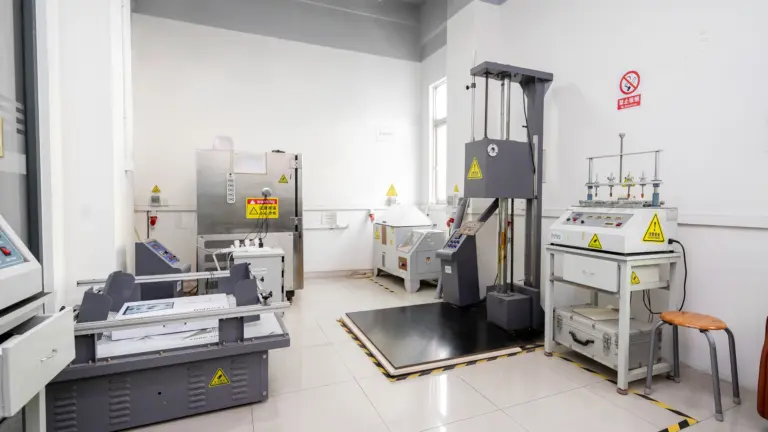
Environmental protection matters as much as uptime. For any unit within reach of liquids or dust — quick-service counters, workshops, outdoor counters under cover —look for an IP65-rated front panel, which seals the display surface against jets of water and ingress of dust. Ask suppliers for the aging-test policy: how long each unit runs under power before shipment, and whether the burn-in report accompanies the order. You can see how a 24/7-rated commercial unit is built in the MT01 Series 10.1–32″ touch monitor with its rugged metal chassis.
Factor 10: Certification and Compliance
Every market you ship to carries mandatory marks. CE and RoHS cover the European Economic Area; FCC covers the United States; additional approvals such as UL (North America) and UKCA (United Kingdom) are requested by many enterprise buyers and tenders. Confirm that the certificates exist for the exact configuration you are ordering — display size, power adapter, and wireless modules all appear on the paperwork, and a mismatch stalls customs clearance.
Ask whether the manufacturer holds an ISO 9001-certified quality management system for the factory itself. Product certificates prove the sample passed testing; a certified QMS indicates the tenth thousandth unit will match the first. For OEM projects where your brand goes on the hardware, ask how the supplier handles certification transfers and whether their engineering team has experience supporting UL or UKCA submissions.
Factor 11: Vendor Support, Lead Times, and Customization Path
The supplier relationship determines how painful the second order is. Compare these items across shortlisted vendors: engineering support during integration (documentation, pin maps, driver packages), sample policy and pricing transparency into mass production, lead times for standard versus customized units, and the customization ladder — from logo printing and custom packaging to interface changes and board-level development. A supplier who quotes a clear mass-production price range at the sample stage protects your project budget from post-approval surprises.
Standard units should ship in days; light customization (العلامات التجارية, colors, interface adjustments) typically adds a short sampling cycle; board-level custom development takes longer and deserves a phased plan. If your deployment will evolve — new sizes, new peripherals — a platform supplier who keeps interfaces and APIs consistent across models reduces requalification work on every follow-on order. Browse our commercial touch display product line to see how one platform spans sizes and form factors.
Factor 12: Warranty, RMA, and Total Cost of Ownership
Read the warranty as a reliability contract. A standard one-year warranty is the commercial baseline; what differentiates suppliers is the process behind it: response-time commitments, whether remote diagnosis comes first, how replacement parts ship (board-level spares by courier beat returning the whole unit), and whether spare units are provided for large orders. Ask who pays freight on warranty claims and where regional spare stock sits.
| Factor | What to Verify | Why It Matters |
|---|---|---|
| Installation format | Mount type, VESA pattern, cable routing | Prevents site rework and adapter costs |
| Panel grade | A-grade IPS stock, brightness in nits | Stops yellowing and early brightness loss |
| Touch technology | PCAP vs. resistive, touch points, glass spec | Matches interaction to environment |
| OS platform | Android/Windows/Linux, kiosk mode, drivers | Software compatibility decides the platform |
| Interfaces | RS232/RS485, جيبيو, نفك, PoE | Determines what peripherals you can attach |
| مصداقية | 24/7 rating, watchdog, IP65 front panel | Keeps unattended sites running |
| شهادة | CE, لجنة الاتصالات الفيدرالية, RoHS, UL/UKCA support, ISO 9001 | Clears customs and tender requirements |
| يدعم & TCO | Warranty terms, RMA flow, spare parts, price lock | Controls cost across the whole deployment life |
Total cost of ownership adds freight, duties, installation labor, spare stock, and service hours to the unit price. A monitor that costs 15% more but ships with a two-year parts pipeline, consistent firmware, and a supplier who answers within a day is usually the cheaper business decision by the second year of operation.
Turn the Checklist Into a Purchase Decision
Score every shortlisted monitor against the twelve factors — format, panel, size, touch, نظام التشغيل, performance, واجهات, reliability, certification, support, customization, and warranty — and weight the factors by your deployment reality. A hospital check-in kiosk weights reliability and compliance heavily; a back-office annotation display weights touch accuracy and ergonomics. The discipline is the same: write down the requirement before the demo, and let the spec sheet answer to it.
Levinko designs and manufactures commercial touch monitors, wall-mounted panels, POS terminals, and self-service kiosks at its Shenzhen factory, with a platform approach that keeps interfaces consistent across screen sizes. If you want a second opinion on your shortlist or a configuration matched to your project, tell us about your deployment and our engineering team will respond with a concrete recommendation.
الأسئلة المتداولة
What is the most important factor when choosing a touch screen monitor for business?
Fit for the deployment environment comes first. A monitor that matches the installation format, operates reliably for the required hours, and carries the interfaces your peripherals need will outperform a technically superior screen that fits none of those constraints. Panel grade, watchdog recovery, and certification follow directly.
Should I choose an Android or Windows touch monitor for business?
Choose by your software stack. Android all-in-one units suit kiosk, الطلب, and room-booking applications with lower cost and simple fleet management. Windows units are preferable for legacy POS software and when peripherals such as receipt printers need Windows drivers — web-based POS on Android often cannot drive printers, an industry-wide limitation worth validating early.
What does an IP65 front panel rating mean for a commercial monitor?
An IP65 front panel is sealed against dust ingress and low-pressure water jets directed at the display surface. It does not make the whole unit waterproof — the rear enclosure and cable glands still need protection — but it does let the monitor survive splashes and wipe-down cleaning in food service, الرعاية الصحية, and light industrial settings.
How does Power over Ethernet (PoE) affect touch monitor installation?
PoE delivers power and data over one Ethernet cable, which simplifies wall-mounted panel installation: no separate outlet, no visible adapter, and easier cable concealment. It reduces installation labor and points of failure — particularly valuable for room scheduling panels and hallway directories deployed across large sites.
What certifications should a commercial touch monitor carry?
CE and RoHS for Europe, FCC for the United States, and market- or tender-specific marks such as UL or UKCA when required. Verify certificates match your exact ordered configuration, including power adapters and wireless modules. An ISO 9001-certified factory adds confidence that production units will match the tested samples.
What is a hardware watchdog and why does it matter for business monitors?
A hardware watchdog is a mainboard-level monitor that watches system health and forces a hardware restart when the operating system or application freezes. On unattended kiosks and signage, it means a crashed unit recovers itself within about a minute instead of showing a frozen screen until someone reboots it — protecting both revenue and brand image.