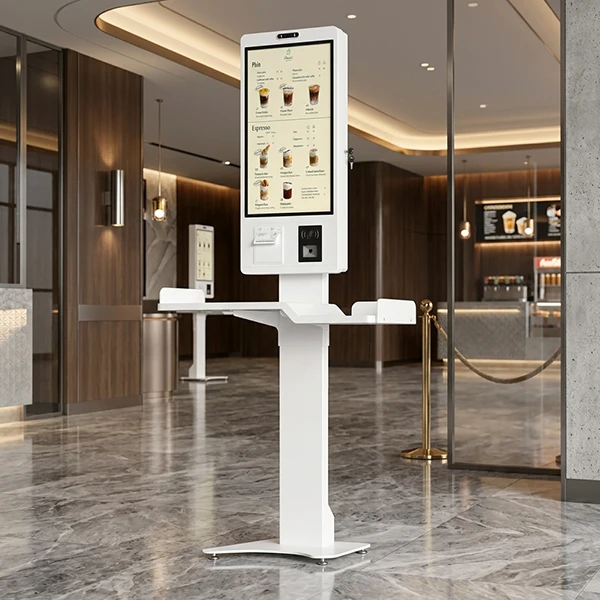
Touch screen monitors have become an essential part of modern commercial systems, from self-service kiosks and POS terminals to industrial control panels and interactive displays. Однако, choosing the right touch technology is not always simple.
Among all touch technologies, capacitive and resistive touch screens remain two of the most widely used options. Each technology has different advantages in terms of accuracy, durability, operating environment, and user experience.
For businesses selecting a commercial touch screen monitor, the best choice depends on how and where the device will be used. A retail kiosk may require smooth multi-touch operation, while an industrial machine may need reliable input through gloves or harsh conditions.
This guide explains the differences between capacitive and resistive touch screens, their working principles, преимущества, limitations, and how to choose the right solution for your project.
What Are Capacitive and Resistive Touch Screens?
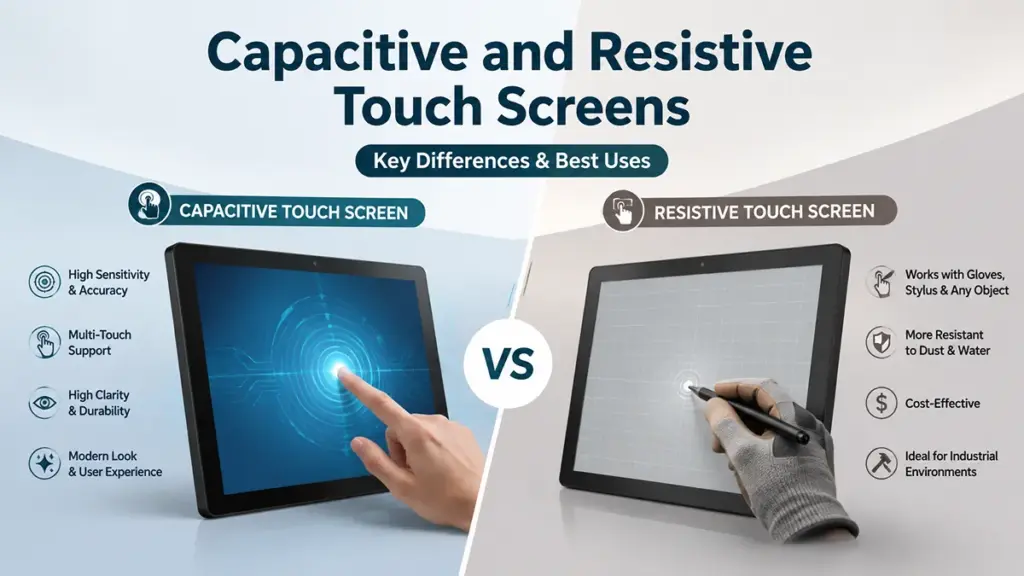
Capacitive screens detect touch via electrical fields for modern, multi-touch interfaces. Resistive screens detect physical pressure, making them ideal for gloved or stylus use.
Capacitive Touch Screens Explained
A capacitive touch screen detects changes in the electrical field caused by a user’s finger or conductive object. It provides a smooth, smartphone-like experience with excellent sensitivity and multi-touch support.
- Detects touch by sensing changes in an electrical field when a conductive object, like a finger, gets close.
- Requires only a light touch and natively supports multi-touch gestures such as pinch-to-zoom and swiping.
- Offers superior image clarity and brightness because its glass surface and laminated layers have no air gaps to cause internal reflections.
- Dominates modern consumer electronics and is increasingly used in industrial and medical fields for its responsive, high-clarity interface.
Resistive Touch Screens Explained
A resistive touch screen works by detecting physical pressure applied to the screen surface. When two conductive layers touch, the system identifies the exact input position.
- Works by detecting physical pressure that pushes a flexible top layer against a rigid bottom layer, completing a circuit at the point of contact.
- Can be activated by any object—a bare finger, a gloved hand, or a simple stylus—making it versatile for rugged environments.
- Typically supports only single-touch input and has lower optical clarity due to its layered construction and internal air gap.
- Remains a cost-effective choice for industrial controls, point-of-sale (POS-терминал) systems, and medical devices where pressure-based input is an advantage.
How Capacitive Touch Technology Works
Capacitive touch screens operate by sensing tiny electrical disturbances in a uniform field. When your conductive finger touches the screen, it disrupts this field, pinpointing the location.
The Core Principle: Sensing Electrostatic Field Changes
A capacitive touch screen projects a stable, uniform electrostatic field across its surface. This field is generated by a grid of transparent conductors. Because the human body is naturally conductive and holds an electrical charge, it can interact with this field.
When a finger gets close to or touches the screen, it disrupts the electrostatic field and alters the local capacitance at that specific point. The entire system works by constantly monitoring for these minute changes, allowing it to register a touch event the instant your finger makes contact.
Most commercial touch monitors today use projected capacitive (PCAP) technology, which places a grid of electrodes behind the glass surface. This allows the system to detect multiple touch points at the same time.
Physical Structure and Key Components
These screens are constructed as a layered stack. A durable cover glass sits on top, providing protection against scratches and impacts. Directly beneath this glass is a transparent conductive layer, most often made of Indium Tin Oxide (ITO), which is patterned into a precise grid of rows and columns.
This grid forms a network of tiny, individual capacitors at each intersection. A flexible printed circuit connects the entire grid to a dedicated touch controller chip, which is the brain of the operation, managing the whole detection process.
The Electrical Scanning and Detection Process
The touch controller continuously applies a small electrical signal to the grid’s electrodes. It then measures the mutual capacitance at every intersection point across the entire screen, establishing a baseline map of values for when the screen is untouched.
A finger touching the surface diverts a tiny amount of electrical charge to the body. This causes a measurable drop in capacitance at the nodes nearest the touch point. The controller rapidly scans the grid, instantly identifying the coordinates of any nodes that show a deviation from the established baseline.
From Raw Data to User Action
Once the controller detects a capacitance change, its firmware calculates the exact X-Y coordinates of the touch. The system is sensitive enough to identify multiple simultaneous touches, which enables multi-touch gestures like pinching to zoom or rotating an image.
These coordinates and gesture data are then sent to the device’s main operating system. The OS interprets this information as a user command, executing actions like opening an application, dragging an icon, or zooming in on a map.
Advantages of Capacitive Touch Technology
1. Excellent user experience
Capacitive screens provide fast response and smooth interaction. Users can easily perform gestures such as:
- Swiping
- Pinching and zooming
- Scrolling
- Multi-finger control
This makes them ideal for applications where customer experience is important.
2. High durability
Because capacitive touch screens are usually covered with a glass surface, they are resistant to scratches and daily wear. Many commercial models also support:
- Tempered glass protection
- Anti-glare coating
- Anti-fingerprint coating
- Waterproof front panels
These features make capacitive monitors suitable for high-traffic environments.
3. Modern appearance
The flat glass design creates a premium look, which is important for retail displays, digital signage, and interactive terminals where appearance affects customer perception.
Limitations of Capacitive Touch Screens
Despite their advantages, capacitive screens also have some limitations.
The biggest challenge is that standard capacitive screens require conductive input. Traditional gloves, plastic tools, or non-conductive objects usually cannot activate the touch function.
Однако, industrial and commercial capacitive monitors can be customized to support:
- Glove touch operation
- Active stylus input
- Higher sensitivity settings
This makes them more adaptable for professional applications.
Your Source for Custom 24/7 Android Terminals
How Resistive Touch Technology Works
Resistive touch operates on simple mechanics: pressure forces two conductive layers to make contact. A controller measures the voltage at this contact point to calculate the exact X/Y coordinates.
The Layer Stack and Core Components
A resistive touchscreen is a sandwich of materials. It consists of a flexible top layer, usually made of polyester plastic, and a rigid bottom layer, which is typically glass or acrylic. The inner-facing surfaces of both these layers are coated with a transparent, electrically conductive material like Indium Tin Oxide (ITO). To keep these two conductive layers from touching when idle, microscopic spacer dots are scattered between them, maintaining a thin air gap.
Pressure-Induced Electrical Contact
Unlike capacitive screens that detect electrical charge, resistive technology works entirely on mechanical pressure. When an operator presses the screen with a finger, stylus, or even a gloved hand, the flexible top layer deforms and bends inward. This pressure is enough to push the top layer across the air gap until it makes physical contact with the bottom layer, closing an electrical circuit at that precise point.
Coordinate Measurement via Voltage Division
Once contact is made, the system needs to find its location. It does this using a voltage division method. First, to find the X-coordinate, a uniform voltage is applied across the horizontal axis of one conductive layer. The point of contact acts as a voltage tap, and the measured voltage is directly proportional to the touch’s horizontal position. Immediately after, the system switches and applies a voltage across the vertical axis to measure the Y-coordinate in the same manner. This rapid alternation between the X and Y axes allows the system to pinpoint the exact location of the touch.
Signal Conversion by the Touch Controller
The raw analog voltages for the X and Y positions are not yet useful to a computer. They are sent to a dedicated touch controller chip. Inside this controller, an Analog-to-Digital Converter (АЦП) translates the analog voltage readings into digital coordinate data (numbers). The controller also filters the signal to remove any electrical noise or inconsistencies from the reading. Finally, it sends these clean, precise digital coordinates to the host operating system, which registers the input as a touch event on the screen.
Advantages of Resistive Touch Technology
1. Works in challenging environments
Resistive touch screens are widely used in industrial applications because they can operate reliably where users may wear protective gloves or use tools.
Common environments include:
- Manufacturing equipment
- Factory automation systems
- Medical devices
- Outdoor control panels
2. High touch accuracy
Because resistive screens detect physical contact directly, they can provide precise input for applications requiring detailed selection.
This is especially useful for:
- Data entry terminals
- Measurement equipment
- Industrial controllers
3. Lower cost
Compared with advanced capacitive solutions, resistive touch technology generally has a simpler structure and lower production cost, making it suitable for projects requiring cost efficiency.
Limitations of Resistive Touch Screens
Resistive screens also have some disadvantages.
The biggest difference is user experience. Compared with capacitive screens, resistive models usually have:
- Lower touch sensitivity
- Slower response
- Limited gesture support
- Less premium feel
The flexible top layer may also experience wear after extensive use, especially in environments with frequent touch operations.
Емкостный против. Resistive: Side-by-Side Comparison
Capacitive screens use electrical touch for speed and clarity. Resistive screens use pressure, working with gloves and tools but sacrificing visuals and multi-touch capability.
| Comparison Factor | Capacitive Touch Screen | Resistive Touch Screen |
|---|---|---|
| Touch Principle | Detects changes in the electrical field when a conductive object, such as a finger, touches the screen. | Detects physical pressure when two conductive layers come into contact. |
| Input Methods | Finger, capacitive stylus, or gloves with touch-compatible technology. | Finger, gloves, plastic stylus, pen, or almost any object that applies pressure. |
| Touch Sensitivity | Very high with fast response and smooth operation. | Moderate; requires slight pressure to activate. |
| Multi-Touch Support | Supports multi-touch gestures such as pinch-to-zoom, swipe, and rotation. | Typically supports single-touch only. |
| Image Clarity | Excellent light transmission with vibrant colors and high display clarity. | Additional touch layers slightly reduce brightness and image sharpness. |
| Touch Accuracy | High accuracy for everyday interaction and gesture control. | Excellent point-to-point accuracy, making it suitable for precise selections. |
| Surface Durability | Glass surface offers excellent scratch resistance and long service life. | Flexible top layer may wear after extensive use or repeated pressure. |
| Resistance to Water & Dust | Can achieve IP-rated protection when properly designed and sealed. | Performs well in dusty environments and can operate even with surface contaminants. |
| Glove Operation | Supported only on specially designed glove-touch PCAP models. | Works naturally with almost all types of gloves. |
| Response Speed | Instant response with a smartphone-like user experience. | Slightly slower due to pressure-based activation. |
| Expected Lifespan | Typically exceeds 50 million touches with minimal performance degradation. | Generally offers around 5–10 million touches, depending on usage conditions. |
| Maintenance | Requires minimal maintenance and is easy to clean. | Protective layers may require replacement after long-term intensive use. |
| Cost | Higher initial investment but lower long-term maintenance costs. | Lower purchase cost, making it suitable for budget-sensitive projects. |
| Best Commercial Applications | Self-service kiosks, POS systems, digital signage, meeting room displays, retail terminals, interactive displays, healthcare equipment. | Industrial control panels, manufacturing equipment, medical instruments, outdoor terminals, factory automation, and rugged environments. |
| Overall User Experience | Modern, intuitive, and highly responsive—ideal for customer-facing applications. | Reliable and practical—ideal where functionality is more important than visual experience. |
Which Industries Prefer Capacitive Touch Screens?
Industries needing modern UIs, clear visuals, and hygienic surfaces—like consumer electronics, розничная торговля, and healthcare—overwhelmingly choose capacitive touch screens for their performance and user experience.
Consumer Electronics
The consumer electronics industry almost exclusively uses capacitive touch screens. Devices like smartphones, tablets, laptops, and smartwatches are defined by the multi-touch gestures this technology supports, such as pinch-to-zoom and swiping. Users expect the fast, precise response and high visual clarity that capacitive panels provide, making it the default choice for modern personal devices.
Розничная торговля, Гостеприимство, and Self-Service Kiosks
You will find capacitive touch technology in most modern point-of-sale (POS-терминал) systems, self-checkout kiosks, and restaurant ordering stations. These high-traffic commercial settings demand a smooth and quick user experience, which capacitive screens deliver. Their bright, clear visuals are also essential for displaying customer-facing menus and product information effectively.
Healthcare and Medical Devices
Capacitive screens are common on patient monitoring equipment, diagnostic devices, and information terminals in healthcare settings. The technology features a seamless glass surface that is easy to clean and disinfect, a critical factor for maintaining hygiene. These screens also provide excellent optical clarity, allowing medical staff to view vital data without distortion or color shift.
Automotive Systems
The automotive industry integrates capacitive touch screens into vehicle infotainment centers, dashboard controls, and navigation systems. This technology enables the responsive input and multi-touch gestures that are now standard in modern vehicle UI design. Beyond pure function, the sleek glass panels contribute significantly to a contemporary and premium interior aesthetic.
Modern Industrial and Commercial HMIs
While resistive screens hold their ground in the harshest settings, capacitive technology is increasingly adopted for newer Human-Machine Interfaces (HMIs) and panel PCs in controlled factory environments. It is the go-to choice for interactive public information kiosks where a consumer-friendly feel is important. Teams select capacitive when gesture support and superior display quality are more valuable than extreme ruggedness for withstanding heavy tool use or severe contamination.
When Resistive Touch Screens Are Still the Better Choice

Resistive touch screens remain the superior choice for harsh environments and gloved use, where reliable, pressure-based input and cost control are more critical than multi-touch gestures.
Performance in Harsh and Rugged Environments
While capacitive screens can fail when exposed to contaminants, a resistive touch screen maintains reliable operation. Its pressure-based activation is far less sensitive to dust, dirt, moisture, or chemical residue on the surface. This technology is also naturally immune to the electromagnetic interference (EMI) common in industrial settings with heavy machinery or power sources. Built for tough conditions, the durable construction is designed to withstand vibration, physical shock, and impacts, making it the go-to choice for industrial automation, military equipment, and outdoor kiosks.
Compatibility with Gloved Hands and Any Stylus
Resistive screens activate with pressure from any object, not just a conductive finger. This means an operator can use thick work gloves, a standard pen cap, or even a tool to interact with the interface. This feature eliminates the need for specialized and often expensive conductive gloves, a significant advantage in many fields. The screen works with any passive, non-powered stylus for precise input, which is a critical requirement for operators in medical, cleanroom, or cold-weather settings where removing gloves is not an option.
High Accuracy for Precision Control
For applications demanding fine control, resistive technology offers superior pointing accuracy. Research indicates it can be three to four times more accurate than capacitive screens for absolute point targeting. This precision allows for smaller on-screen buttons and controls, and it excels at registering input from fine-tip styluses for signatures or detailed annotations. This accuracy helps reduce input errors in applications like medical devices and test instruments, where mistakes can be costly. The predictable, single-touch response also removes the risk of accidental gesture activation common on capacitive screens.
Cost-Effectiveness for Budget-Sensitive Applications
Resistive technology features a lower manufacturing cost per unit compared to its capacitive counterparts, particularly at larger screen sizes. This directly reduces the total hardware cost for large-scale deployments in sectors like retail, logistics, or hospitality. It provides a practical and functional solution for any equipment where the user interface does not require multi-touch gestures or premium visual clarity. For projects where reliable function is the primary goal, choosing resistive screens helps control budgets without compromising core operational needs.
Factors to Consider Before Making a Decision

Choosing a touch screen requires balancing modern user experience and optical clarity against rugged performance, input flexibility, and initial hardware cost.
Operating Environment and Input Method
The environment is a primary deciding factor. Resistive screens are built for harsh conditions, performing reliably when exposed to dust, moisture, and extreme temperatures. Their pressure-based detection makes them largely immune to electromagnetic interference (EMI) and prevents accidental activation from light brushes or contaminants. If operators must use thick work gloves or any non-conductive stylus, resistive technology is the direct solution as it responds to pressure from any object.
Capacitive screens, on the other hand, require a conductive input. While they can be engineered for industrial use with special sealing and controller tuning, standard models can struggle with heavy moisture or thick, non-conductive gloves. Their high sensitivity, ideal for fast response, also makes them more susceptible to accidental touches in cluttered or messy environments.
User Experience and Application Needs
The required user experience often dictates the choice. If your application depends on a modern, fluid interface with multi-touch gestures like pinch-to-zoom and swipes, capacitive technology is the standard. It delivers the fast, smartphone-like responsiveness users now expect. This is reinforced by its superior optical quality; the laminated glass construction provides greater brightness, contrast, and color vibrancy, which is critical for data-rich dashboards or high-quality visuals.
Conversely, if the interface is built around simple button presses or requires precise single-point selections, a resistive screen is perfectly adequate. Its pressure-based system works well for deliberate, controlled inputs and can offer high accuracy when used with a stylus, making it suitable for applications like industrial control panels or POS terminals with basic menus.
Durability and Mechanical Robustness
For long-term durability, each technology has different strengths. Capacitive screens feature a hard glass surface that offers high resistance to scratches and chemicals, making them ideal for high-traffic areas and frequent cleaning. With no moving parts, their lifespan is significantly longer, often rated for over 50 million touches per point, and they maintain stable calibration throughout their life.
Resistive screens have a flexible plastic top layer that is more vulnerable to scratches and wear from repeated pressure. This mechanical flexing can lead to a shorter lifespan (1-5 million touches) and a potential need for periodic recalibration as the materials age. While the flexible surface can be pierced by sharp objects, ruggedized capacitive screens with tempered glass can offer superior impact resistance for environments with a risk of vandalism.
Budget and Total Cost of Ownership
Initial hardware budget is a clear differentiator. Resistive screens are less expensive to manufacture, making them an attractive choice for projects with tight cost constraints. Capacitive screens have a higher upfront cost due to more complex electronics and materials.
Однако, total cost of ownership (TCO) can flip this equation. The longer lifespan, greater durability, and lower maintenance needs of capacitive screens often make them more economical over the product’s full lifecycle, especially in high-use applications. A higher upfront cost for a capacitive display can be justified by improved user productivity and satisfaction. It’s also important to consider hidden costs: a resistive screen might require protective overlays to prevent scratches, while a capacitive system may necessitate an investment in special conductive gloves for operators.
Levinko Helps You Choose the Right Touch Technology for Your Project
Levinko Technology Limited provides commercial touch screen monitor solutions for global businesses, системные интеграторы, and industrial applications.
With experience in touch display development and manufacturing, Levinko supports customers with:
- Capacitive and resistive touch screen solutions
- Custom display sizes and configurations
- OEM/ODM development support
- Андроид, Окна, and Linux compatibility
- Commercial-grade production capabilities
Levinko’s touch monitors are designed for applications including:
- Self-service kiosks
- Digital signage
- POS systems
- Industrial control terminals
- Smart meeting solutions
By understanding your working environment, user requirements, and integration needs, Levinko helps you select a reliable touch solution that balances performance, durability, and cost.
Conclusion
Capacitive touch screens deliver a modern, responsive experience and are ideal for customer-facing systems such as kiosks, digital signage, and interactive displays.
Resistive touch screens remain a reliable choice for industrial environments where glove operation, precision, and durability are more important than gesture control.
The best commercial touch screen monitor is not always the most advanced technology—it is the one that matches your specific application.
By evaluating environment, user requirements, durability, and system integration needs, businesses can choose the right touch technology for long-term success.
Часто задаваемые вопросы
What is the difference between a capacitive and a resistive touch screen?
Capacitive screens detect touch via changes in an electrical field, supporting multi-touch gestures and offering high sensitivity with a light touch. Resistive screens detect physical pressure that connects two conductive layers, allowing input from a finger, stylus, or gloved hand, but they typically only register a single touch at a time.
Which is better, a capacitive or resistive touch screen monitor?
Neither is universally better, as the choice depends on the application. Capacitive monitors are superior for visual clarity, responsiveness, and multi-touch gestures, making them ideal for modern user interfaces. Resistive monitors are better for low-cost solutions, use with any type of glove or stylus, and operation in many harsh industrial environments.
Can capacitive touch screens work with gloves?
Да, but only when the system and gloves are compatible. Standard capacitive screens often fail with regular, non-conductive gloves. Однако, they can work reliably with special conductive or touchscreen-compatible gloves. Many industrial capacitive panels also feature a ‘glove mode’ that increases sensitivity to work with specific types of work gloves.
Are resistive touch screens still used in 2026?
Да, resistive touch screens are still actively used in professional and industrial applications. They remain a preferred choice for medical equipment, factory control panels, and outdoor kiosks where operation with heavy gloves, tolerance for contaminants, and lower cost are more critical than multi-touch or high-end visual quality.
What are the main disadvantages of resistive touch screens?
The primary disadvantages of resistive touch screens include lower optical clarity and brightness, the need for physical pressure to activate, limited or no multi-touch support, and a higher tendency for the flexible top surface to get scratched, show wear, or lose calibration over time.
What is a projected capacitive (PCAP) touch screen?
A projected capacitive (PCAP) screen is the technology used in most modern touch devices. It uses a grid of transparent electrodes under a protective glass surface. When a conductive object like a finger touches the glass, it alters the electrostatic field at that point on the grid, allowing the controller to precisely calculate the touch location. This enables a light touch, high durability, and true multi-touch capability.