A wall-mounted tablet is the smallest screen with the biggest job description: room scheduling panel, door-side check-in, in-room control interface, digital directory, point-of-information station. Because it bolts directly into the building — often dozens or hundreds of units at a time — the size, power, and mounting decisions made at purchase time are locked in for the life of the deployment. Rework is expensive, and a wrong power strategy can turn a one-day install into a per-floor cabling project.
This guide covers how to choose a wall-mounted tablet for commercial projects: matching screen size to the use case, choosing between PoE and conventional power, planning the mounting, and specifying the performance, connectivity, and durability the application demands. It is written for facility managers, AV/IT integrators, and SaaS companies deploying room-booking or control software at scale.
Points clés à retenir
- Match size to interaction distance: 10.1-inch panels for door-side room scheduling and control, 15.6-inch for directories and POS-style wall stations, 21.5-inch where content leads.
- Alimentation via Ethernet (PoE) turns a multi-cable wall install into a single network drop — the default choice for large panel fleets.
- Plan mounting before purchase: Modèles VESA, wall construction, concealed cabling, and mounting height by use case.
- Specify kiosk-mode lockdown at the factory so panels boot straight into your application and nothing else.
- For fleet deployments, choose a platform family with consistent interfaces and APIs across sizes — one software build runs the entire wall.
Start With the Use Case, Not the Hardware
Wall-mounted tablets serve four dominant commercial roles, and each implies a different hardware profile:
- Room scheduling and status — mounted beside meeting-room doors, showing availability now and next, with optional LED status bar and NFC tap-to-check-in.
- Control panels — in-room interfaces for lighting, AV, climate, or door access, often integrated with RFID credentials and building systems.
- Information and directories — wayfinding, floor directories, service menus, and building notices in lobbies, couloirs, and healthcare settings.
- Wall POS and self-service stations — order points, check-in terminals, and payment stations where counter space is unavailable.
Write down the role before comparing hardware. A scheduling panel needs glanceable status and calendar sync; a control panel needs responsive touch and integration interfaces; a directory needs display quality more than touch precision. The sections that follow map each requirement to the specifications that satisfy it. Our wall-mounted tablets and panels line shows how one platform serves all four roles.
Taille de l'écran: Matching the Panel to the Wall
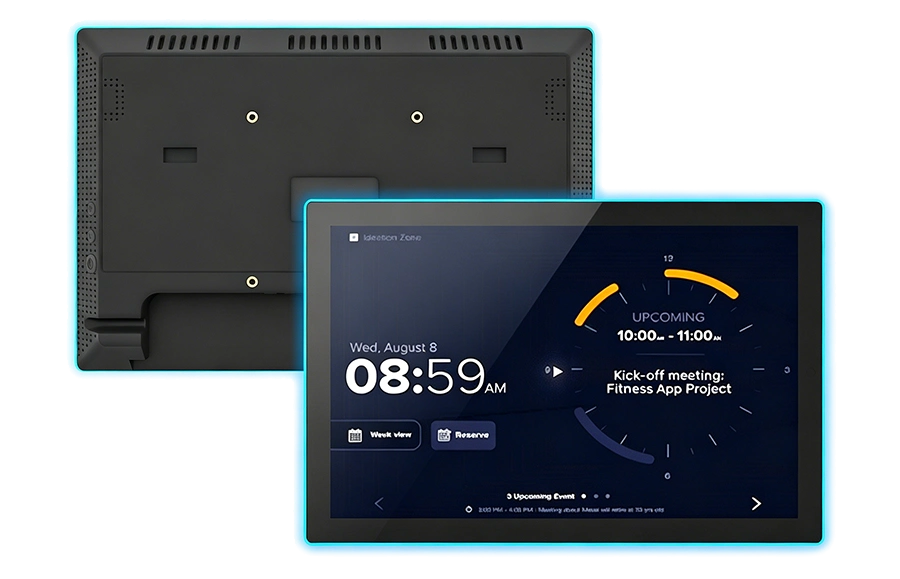
Commercial wall tablets cluster around three sizes, each with a natural role:
- 10.1 inch — the default door-side format. Large enough for calendar status and controls at arm’s length, small enough to sit cleanly beside a door frame. This is the standard for room booking panels and in-wall control.
- 15.6 inch — the step-up for wall directories, service menus, and POS-style wall stations where users stand close but need more content on screen.
- 21.5 inch and above — for content-led roles: wayfinding walls, digital signage touchpoints, and self-service stations where the display carries the experience.
Two rules keep the decision honest. D'abord, users interact with wall panels standing — size for a 0.5 à 1.5 meter interaction distance, not desktop ergonomics. Deuxième, when a fleet mixes sizes, buy from one platform family so the software, mounting accessories, and spare parts stay consistent. A concrete example is the PW1031T 10.1-inch Android PoE touch panel with its LED status bar — the door-side scheduling format — and the larger PW1537T 15.6-inch PoE touch tablet for wall directories, which share the same platform architecture.
Pouvoir: Why PoE Wins the Wall
Power strategy is the single most consequential decision in a wall-panel project, and for commercial deployments the answer is usually PoE (Alimentation via Ethernet). One Category cable delivers both power and data to the panel: no outlet behind the wall, no adapter brick to conceal, no electrician per install. For a fifty-panel deployment, that difference compounds into real labor savings, simpler cable management, and centralized power management at the switch — including remote power-cycling a misbehaving panel from the IT closet.
Conventional DC power makes sense when panels sit near existing outlets, when existing structured cabling cannot carry PoE, or for a single-panel pilot. In-wall power runs require an electrician and lock panel positions to outlet locations. Whatever the choice, decide before ordering: PoE and DC units are configured differently, and mid-project power rework on mounted hardware is the most expensive kind. Our dedicated PoE touch panel line covers both door-side and larger formats with single-cable installation.
Mounting and Installation Planning
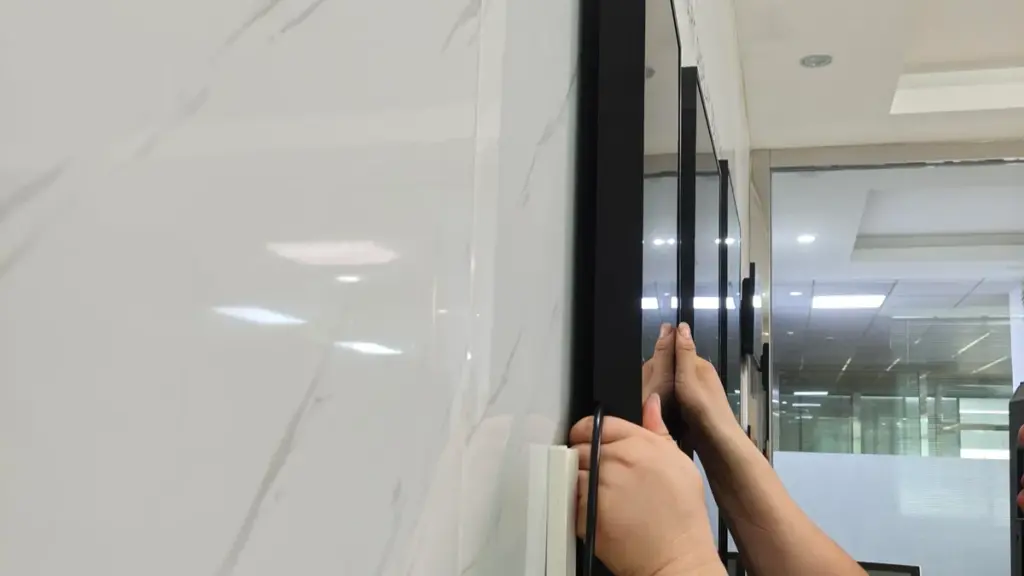
Mounting planning has four parts, and each one is cheaper to resolve on paper than on a ladder:
- Wall construction — drywall, béton, verre, or millwork each need different anchors and brackets; verify before ordering mounting hardware.
- Mounting pattern and bracket — confirm the panel’s VESA or proprietary pattern, whether brackets ship with the unit, and whether the mount allows leveling adjustment after fixing.
- Cable concealment — plan the cable path (in-wall, chemin de roulement en surface, or furniture integration) and confirm the panel’s cable entry points match it. Commercial panels are designed for concealed or near-concealed wiring.
- Height and accessibility — door-side panels mount at eye level beside the latch side of the frame; interactive stations comply with local accessibility height requirements. Fix heights per use case before the first drill hole.
For new construction or major renovations, coordinate panel positions with electrical and network rough-in drawings — the cheapest moment to add a network drop is before the drywall closes. For retrofits, PoE panels with a single cable entry turn each install into a bounded, repeatable task.
Performance, Système d'exploitation, and Software Lockdown
Most wall-panel applications — room booking, répertoires, control interfaces — run a single dedicated application, which makes Android the natural platform: quick boot into one app, straightforward fleet management, and hardware built on mainstream SoCs such as Rockchip RK3566/RK3568 with power consumption suited to always-on wall duty. Windows panels matter when the wall station must run legacy applications or drive peripherals that need Windows drivers.
For any public or semi-public installation, specify kiosk mode locked at the factory: the panel boots straight into your application, auto-starts it after any crash or power cut, and prevents users from reaching the home screen or settings. Verify how the supplier handles keep-alive (the application restarting if killed) and remote updates — a fleet of wall panels that requires a USB stick visit per unit is a fleet with a hidden operations budget. Panels that run your calendar or booking software should also be validated against that software on the target hardware before the volume order.
Connectivité: NFC, Serial, and the Building Around the Panel
Wall panels rarely work alone — they join the systems around them. Specify the connections the role requires: NFC/RFID readers for tap-to-check-in and credential-based access; RS485/RS232 to integrate with building automation, door controllers, and AV equipment; GPIO outputs to drive door strikes or signaling; and Wi-Fi/BT for wireless deployments. An LED status bar — green for available, red for occupied — readable from down the corridor, is one of the highest-value options on scheduling panels because it answers the question before anyone reaches the door.
Software teams should confirm the supplier exposes a documented API/SDK for these hardware functions. Levinko’s model-agnostic API means the same calls that drive the NFC reader and LED bar on a 10.1-inch scheduling panel also drive the larger wall formats — one integration for the whole wall fleet, and your calendar software talks to every panel the same way.
Durability and Environmental Fit
Wall panels are mounted, touched, and forgotten — which is exactly why their durability spec matters. Commercial units are built for continuous operation with hardware watchdog recovery (Levinko’s watchdog restarts a frozen panel in roughly 50 secondes), enclosed in tempered glass and engineering plastics, and specified with IP65-rated front panels for locations that get wiped down or splashed — healthcare corridors, kitchens, workshops. A watchdog matters doubly on walls: nobody is standing next to a wall panel to notice it froze overnight.
Verify the panel is rated for the ambient conditions of the actual wall: sunlit glass corridors heat up, loading docks run cold, and panels near doors meet dust and drafts. Continuous-operation ratings and aging tests at the factory are the difference between panels that disappear into the building and panels that generate tickets.
Standard or Custom: Sourcing the Right Panel
| Decision | Standard Panel | Customized Program |
|---|---|---|
| Best for | SaaS deployments, intégrateurs, standard rollouts | Brand programs, unique enclosures, special interfaces |
| Lead time | Standard stock ships in days | Image de marque: jours; mechanical changes: 7–10 days sampling |
| Image de marque | Supplier’s enclosure and boot screen | Your logo, colors, packaging, boot screen, pre-installed app |
| MOQ | From one unit — pilot freely | Branding from one unit; deep custom quoted per project |
| Typical buyer | Room-booking SaaS, facility teams, SI projects | Hardware brands, hotel groups, OEM product lines |
Start standard, customize when the deployment earns it. SaaS companies shipping room-booking software typically take a standard PoE panel with their application pre-installed — a white-label step that ships in days. Brand programs with signature enclosures or specific interface sets move into mechanical customization with sampling in 7 à 10 jours ouvrables. Either way, buy from a manufacturer who will document the platform, support the integration, and still be building the same panel family when your fleet doubles. Explore configurations on the Levinko product overview or send us the deployment brief — we will match sizes, power, and mounting to your floor plan.
Foire aux questions
What size wall-mounted tablet should I choose for a meeting room panel?
10.1 inches is the established door-side format — readable at arm’s length for availability status and upcoming bookings, compact enough to sit beside the door frame. Choose 15.6 inches when the panel doubles as a directory or detailed information display. Mount at eye height on the latch side of the door for natural approach flow.
Can a wall-mounted tablet be powered by PoE?
Yes — PoE (Alimentation via Ethernet) wall tablets take power and data over a single network cable, eliminating the need for outlets or adapters at the panel. This simplifies installation, enables centralized power management and remote power-cycling from the switch, and keeps cabling concealed. It is the default choice for multi-panel commercial deployments.
How do I keep a wall tablet locked to one application?
Use kiosk mode, locked at the factory: the panel boots directly into your application, restarts it automatically after crashes or power cuts, and blocks access to the home screen and settings. Commercial Android platforms support system-level kiosk lockdown, and suppliers like Levinko pre-configure it before shipment so units arrive deployment-ready.
What mounting considerations matter for wall tablets?
Confirm wall construction (cloison sèche, béton, verre, millwork) against the bracket and anchors; verify the panel’s mounting pattern and whether brackets ship with it; plan cable concealment through the panel’s actual cable entry points; and fix mounting height per use case — eye level beside doors, hauteurs accessibles pour les stations interactives. Decide all of this before ordering.
What is an LED status bar on a meeting room panel?
An LED status bar is a colored light strip on the panel enclosure — typically green for available and red for occupied — that communicates room status from down the corridor without approaching the screen. It is one of the highest-value options on scheduling panels because it answers the most common question before anyone reaches the door, and it can be controlled programmatically through the platform’s API.
Can I brand wall-mounted tablets with my company’s identity?
Oui. White-label programs apply your logo by silk-screen, custom packaging, branded boot screens, and factory pre-installed software while keeping the proven standard hardware — shipping in days with orders starting from a single unit. Programs needing signature enclosures, specific colors, or added interfaces move into mechanical customization with sampling in 7 à 10 jours ouvrables.