You may be planning to launch your own digital signage product line, looking for an OEM/ODM partner, or sourcing commercial displays for a large-scale project. In each case, choosing the right manufacturer can affect your product quality, development costs, delivery schedules, and after-sales service.
A supplier may offer competitive prices and a wide product range, but can it customize the hardware, support your software integration, maintain consistent quality across bulk orders, and supply replacement parts when needed? These are the questions B2B buyers need to consider before making a sourcing decision.
In this guide, we explain how to evaluate a digital signage manufacturer, from factory capabilities and component sourcing to engineering support, customization, and long-term supply.
Key Takeaways
- Verify Manufacturing Capabilities: Check factory addresses, production lines, SOPs, and quality inspection records rather than relying on marketing claims.
- Evaluate In-House Engineering: Confirm who designs the mainboard, develops firmware, and maintains API/SDK documentation.
- Certification capability splits by market — CE, FCC, RoHS as the export baseline, with proven program support for UL (North America) and UKCA (United Kingdom) where your channel requires them.
- Read customization in tiers: white-label branding ships in days, light customization (色, materials, インターフェース) samples in one to two weeks, deep customization (tooling, mainboard, ファームウェア) runs about a month to sample.
- – Review Commercial and After-Sales Terms: Confirm volume pricing, lead times, warranty coverage, technical support, and spare parts policies.
Step 1: Identify Whether You Are Dealing with a Manufacturer, Assembler, or Trader
The digital signage supply chain includes three main types of suppliers: trading companies, assemblers, and source manufacturers. They may offer similar products, but their control over production, engineering, and customization differs significantly.
| Supplier Type | Main Responsibilities | Customization Capabilities | Main Limitations |
|---|---|---|---|
| Trading Company | Resells products from other factories | Mainly standard products and basic branding | Limited control over product quality, production schedules, and customization |
| Assembler | Sources mainboards and panels, then assembles finished products | Some enclosure and configuration changes | Depends on upstream suppliers for mainboard and firmware modifications |
| Source Manufacturer | Designs and manufactures core electronics and finished products | Hardware, ファームウェア, structural, and product-level customization | Requires verification of actual in-house manufacturing and engineering capabilities |
A trading company buys products from factories and resells them to customers. An assembler puts different components together to make finished products. しかし, assemblers may still rely on outside suppliers for key parts, hardware changes, and firmware updates.
A source manufacturer has more direct control over product development and production. Depending on its capabilities, it may handle mainboard design, firmware development, enclosure design, and final assembly. This makes it easier to manage custom projects and respond to specific product requirements.
For brand owners building their own digital signage product lines, this difference matters. Basic branding may be available from different types of suppliers, but custom interfaces, firmware features, enclosure designs, and product development usually require a manufacturer with stronger engineering capabilities.
で Levinko, we operate as a source manufacturer of digital signage products, providing direct manufacturing and OEM/ODM services for global B2B customers. By working directly with our factory, buyers can communicate their requirements with our team and explore product solutions tailored to their business needs.
How to Verify a Manufacturer’s Identity
Do not rely solely on website descriptions or sales representatives’ claims. Request concrete evidence during supplier evaluation:
- Factory Address: Check whether the factory address matches the address on the business license and quotation.
- Live Factory Walkthrough: Request a video walkthrough during production hours to see the actual manufacturing environment.
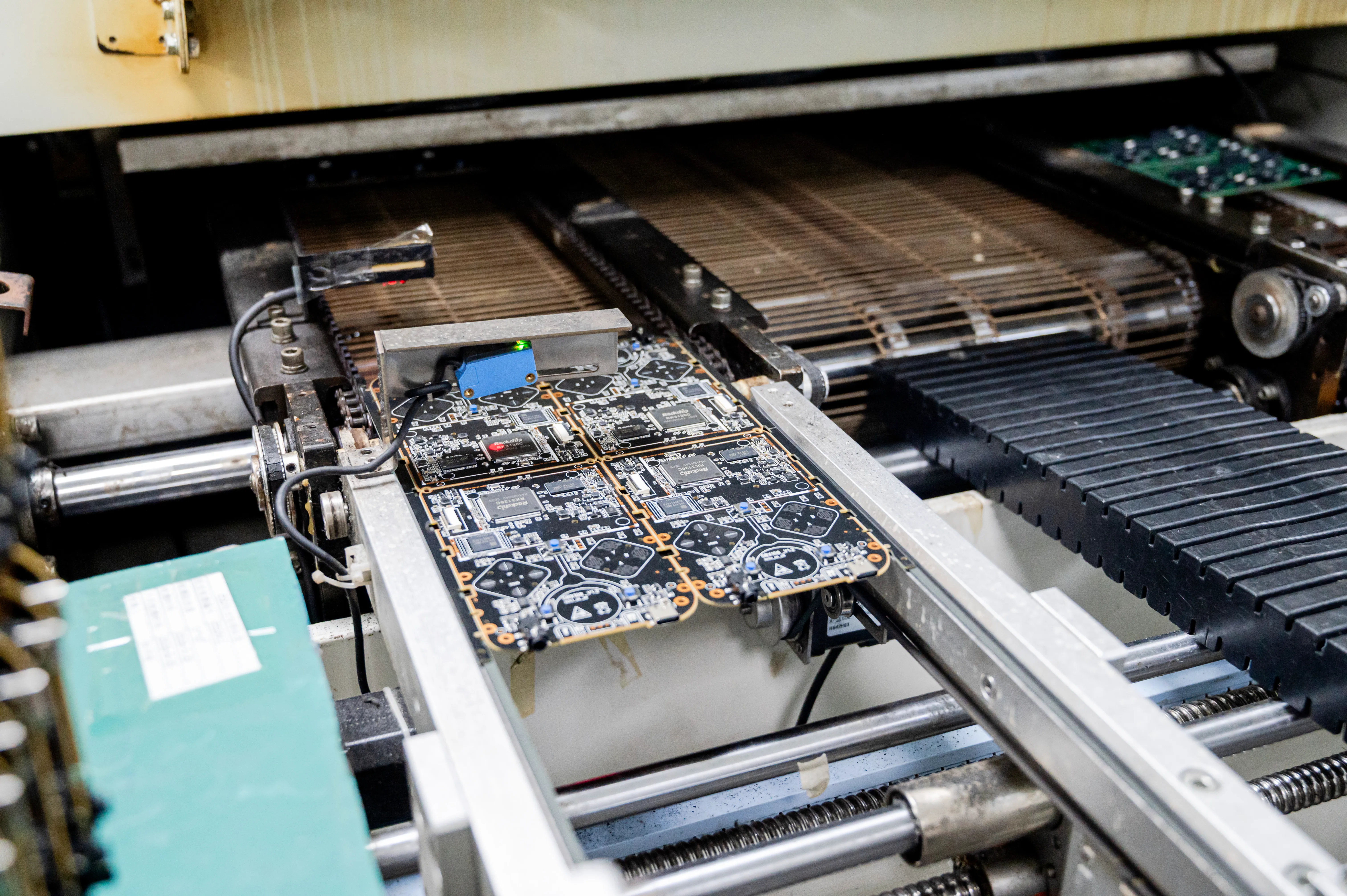
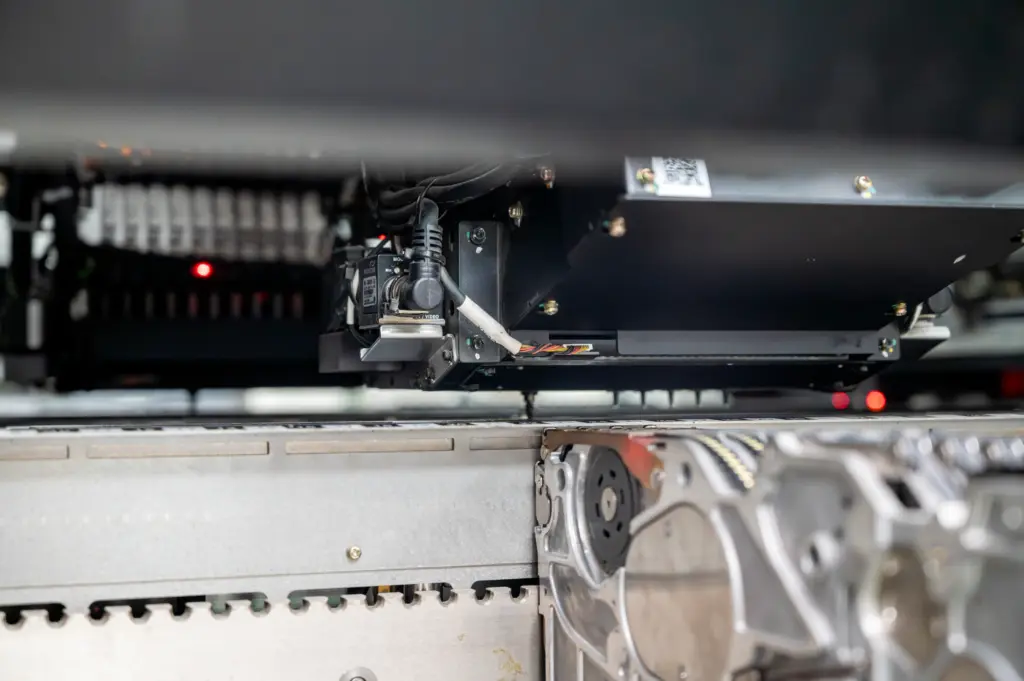
- Production Equipment: Look for SMT (Surface-Mount Technology) lines or board assembly stations, chassis assembly areas, and other relevant equipment.
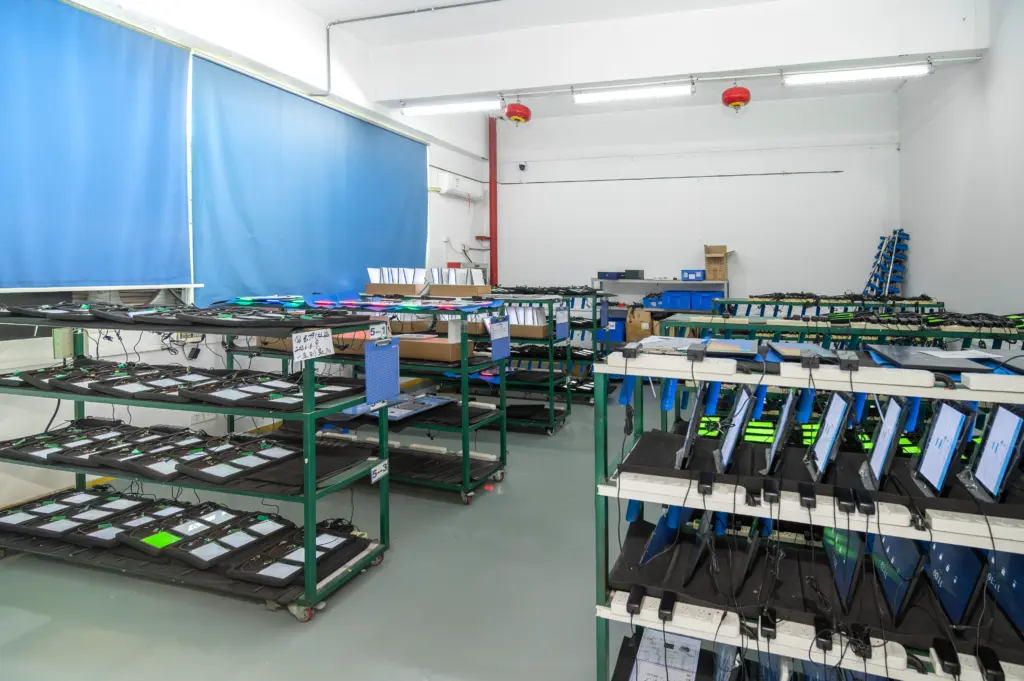
- Quality Inspection Areas: Check whether incoming-quality-control stations and aging test racks are available.
- Production Documentation: Ask to see documented SOPs and sample inspection records.
- Brand References: Request references from existing brands in your region that use products manufactured by the supplier.
You should also ask who designed the mainboard and who maintains its firmware. A genuine manufacturer should be able to explain its engineering responsibilities and production processes clearly. If a supplier repeatedly avoids these questions, treat that as a warning sign.
Step 2: Evaluate Factory Scale and Process Control
Factory scale and process control are two separate factors. Both influence whether a manufacturer can support your current order and maintain consistent product quality as your business grows.
Evaluate Production Scale and Long-Term Stability
Production scale helps determine whether a factory can handle your order volume without delaying delivery. Ask about the following:
- Facility Size and Production Lines: Understand the factory’s manufacturing space, assembly line count, and available production resources.
- Monthly Production Capacity: Request the manufacturer’s actual monthly capacity for the relevant product category.
- Capacity Utilization: Find out how much production capacity is currently being used. A factory with sufficient available capacity is generally better positioned to accommodate new orders and urgent production requests.
- Years in Operation: Review its operating history and experience in commercial display manufacturing.
- Product Development History: Check whether the manufacturer regularly introduces new screen sizes, hardware platforms, and SoC generations.
A growing product catalog may indicate continued investment in engineering and product development. In contrast, a manufacturer relying on an unchanged catalog for years may have limited resources for future platform updates.
Check the Factory’s Quality Control Processes
High production capacity does not always mean good product quality. The actual manufacturing process determines whether products meet the same standards across different batches.
Burn-in testing commonly involves continuous operation for 24 に 48 時間. It helps identify early component failures before products reach customers, reducing the risk of returns during the initial deployment period.
| Quality Control Process | 購入者が確認すべきこと |
|---|---|
| Documented SOPs | Written assembly procedures followed at each production station |
| Incoming Quality Control (IQC) | Inspection records for panels, touch assemblies, sheet metal, and electronic components |
| End-of-Line Testing | Functional testing of displays, touchscreens, ports, and connectivity before packaging |
| Burn-In or Aging Testing | Continuous powered operation to identify early-life failures before shipment |
Step 3: Check Panel Sourcing and Component Transparency
The display panel has a direct impact on image quality, 輝度, color consistency, and viewing angles. That is why it is important to understand where the manufacturer gets its panels and how it manages component quality.
Start by checking the panel grade listed in the quotation. Commercial digital signage products generally use A-grade IPS (In-Plane Switching) panels, which offer consistent colors and wide viewing angles.
Be careful with quotations that simply describe a panel as “high quality LCD” without giving its grade or other relevant details.
Key Panel Specifications to Check
- Panel Grade: Confirm whether the product uses A-grade panels suitable for commercial applications.
- Panel Suppliers: Ask which panel manufacturers the supplier works with.
- Sourcing Arrangements: Find out whether panels come from regular suppliers or are purchased based on market availability.
- Brightness Options: Ask whether high-brightness panels are available for bright indoor or outdoor environments. Applications exposed to strong ambient light may require 1,000 nits or higher, depending on the installation conditions.
- Color Consistency: Find out how the manufacturer checks panel quality across different production batches.
You should also ask about the other key components used in the product.
Check the Main Hardware Components
Ask which SoC (System-on-Chip) platforms the manufacturer uses in its digital signage products. 例えば:
- Rockchip platforms are commonly used in Android digital signage players.
- Intel Core or Celeron platforms may be used in Windows-based digital signage systems.
Check whether the processors, memory, and other key components can remain available for the length of time you plan to sell the product.
It is also worth asking how the manufacturer handles component changes. Will it tell you before replacing a panel supplier, memory vendor, or other important component? Does it test replacement parts before using them in mass production?
These details matter because changes in components can affect product performance. You want the products you receive in later orders to perform consistently with the samples you have approved.
Step 4: Verify In-House Engineering Capabilities for Mainboard, ファームウェア, and API/SDK
Engineering support becomes especially important when you are developing your own product line or integrating digital signage hardware with your software.
A product may have the right screen size and specifications but still fail to work with your application, 周辺機器, or existing system. Before choosing a supplier, check its capabilities in three key areas.
Mainboard and PCBA Design
First, ask whether the manufacturer designs its own mainboards or buys ready-made boards from other suppliers.
In-house PCBA (Printed Circuit Board Assembly) design and embedded engineering capabilities make it easier to handle hardware changes for specific projects.
例えば, your project may need additional interfaces such as:
- RS232 and RS485 for serial communication.
- PoE (パワーオーバーイーサネット) for network connectivity and power delivery.
- NFC (Near Field Communication) for contactless interactions.
- GPIO (General-Purpose Input/Output) for controlling external devices.
A manufacturer with its own engineering team can review these requirements and assess what changes are possible. If it relies entirely on an outside board supplier, even small hardware changes may take longer.
Firmware Development and System Control
次, find out what the manufacturer’s engineering team can do with the firmware.
Some common firmware features include:
- Boot Settings: Set the device to start automatically when power is connected.
- キオスクモード: Restrict access to system settings and other functions on public-facing screens.
- OTA Updates: Allow firmware and software updates over the air.
- Peripheral Drivers: Support communication with connected devices and accessories.
- App Configuration: Pre-install applications and set permissions, auto-start, and background operation.
When a manufacturer can manage firmware changes, it can better adapt the device to your application. Otherwise, you may need to depend on another hardware or software supplier whenever you need a change.
API/SDK Documentation and Integration
If you are a software company or digital signage solution provider, API/SDK support is another important point to check.
Ask what functions the API supports and whether the same functions work across different screen sizes and product models.
例えば, your software may need to:
- Control LED status indicators.
- Read NFC or RFID (Radio-Frequency Identification) input.
- Communicate with devices connected through serial ports.
- Control screen power settings.
- Access other device-level functions.
If the API works in the same way across a 10.1-inch panel and a 32-inch digital signage totem, you may be able to use the same software integration across multiple products.
This can save development time and reduce repeated work across different SKUs (Stock-Keeping Units).
Ask for These Technical Documents Before Ordering Samples:
- SDK documentation.
- Pin definition diagrams.
- Interface protocol documents.
- Mainboard specifications.
- Supported driver and peripheral information.
例えば, RK3566 and RK3568 are Android mainboard platforms used in digital signage and kiosk products. The board design affects which hardware interfaces, firmware features, and API functions the product can support. You can also explore our RK3566/RK3568 Android mainboard with PoE to learn more about its features and applications.
Step 5: Confirm Certification Support for Your Target Markets
Certification requirements depend on where you plan to sell your products and how they will be used. Before choosing a manufacturer, identify the requirements for your target markets and check whether the supplier can provide the relevant documents.
CE, FCC, and RoHS are common certification considerations for digital signage products sold in international markets. The exact requirements depend on the product and its destination market.
| 認証 | Target Market | What to Check |
|---|---|---|
| CE | European Economic Area | Applicable product conformity requirements |
| FCC | United States | Relevant electromagnetic compatibility requirements |
| RoHS | Markets with hazardous substance restrictions | Compliance with restricted substance requirements |
| UL | North America | Applicable product safety listing requirements |
| UKCA | Great Britain | Applicable UK product conformity requirements |
If you plan to sell products in several markets, ask which certifications are already available for the models you are interested in and which ones would require additional testing.
Step 6: Compare OEM/ODM Customization Levels and Sample Workflows
OEM (Original Equipment Manufacturer) and ODM (Original Design Manufacturer) services allow you to adapt digital signage products to your brand and project requirements.
しかし, not all customization requests involve the same amount of work. It helps to understand the main customization options before discussing prices and delivery times.
| Customization Level | Typical Services | Estimated Sample Lead Time |
|---|---|---|
| White-Label | ロゴ印刷, custom packaging, branded boot animation, and pre-installed applications | 3–5 days |
| Light Customization | Chassis color matching, material selection, and adding or removing interfaces | 7–10 days |
| Deep ODM Customization | New structural tooling, mainboard modifications, and customized firmware features | 30–35 days |
White-label customization is a good option if you want to sell existing products under your own brand. It usually includes logo printing, custom packaging, branded boot animations, and pre-installed applications.
Light customization allows you to change selected product features while keeping the existing hardware platform. Common requests include Pantone-matched chassis colors, different materials such as aluminum alloy or engineered ABS/PC, and interface changes such as adding or removing RS232, RS485, PoE, or NFC.
Deep ODM customization involves more extensive development work. This may include new enclosure tooling, mainboard changes, and custom firmware features. These projects usually need more engineering time and a separate project plan.
Before moving forward, ask the supplier to explain what each customization option includes, how much it costs, and how long it will take. Clear answers help you avoid delays and unexpected costs later.
Step 7: Review After-Sales Terms, Pricing Integrity, and Long-Term Partnership
The final step is to review the commercial terms and support you will receive after delivery. This is especially important for brand owners and distributors, as you may need to work with the same manufacturer for several years.
Check Pricing and Payment Terms
Ask for quotations at different order quantities and confirm price validity, deposit and balance arrangements, and shipping terms such as EXW, FOB, or DDP. For long-term projects, also discuss how changes in key component costs may affect future orders.
Check Warranty and Technical Support
Confirm the warranty period, RMA process, and technical support options. Ask whether the manufacturer can provide remote troubleshooting, replacement mainboards, and electronic modules to help reduce downtime.
Check Spare Parts and Product Continuity
Find out how long each model will remain available, whether firmware updates will continue, and how much notice you will receive before a product is discontinued. For long-term projects, confirm whether compatible replacement components can be supplied.
ついに, compare shortlisted manufacturers based on their production records, technical capabilities, sample test results, and commercial terms. A supplier with transparent processes and consistent support is more likely to become a reliable long-term partner.
Choose LEVINKO as Your Digital Signage Manufacturing Partner
Choosing a digital signage manufacturer means finding a partner that can support your product requirements, software integration, and long-term supply needs. Here is what LEVINKO offers to B2B buyers:
- Direct Manufacturing: A 3,000㎡ production facility with in-house SMT lines, 組み立て, and quality control processes.
- Reliable Product Quality: A-grade LCD panels and 100% full-load aging tests before shipment.
- Hardware and Software Engineering: Support for Android, 窓, とリナックス, with API/SDK documentation and custom PCBA development.
- Flexible OEM/ODM Services: Custom logos, enclosures, インターフェース, ファームウェア, and hardware configurations to meet different project requirements.
- Long-Term Technical Support: A 1–3 year hardware warranty, remote troubleshooting, RMA services, and spare parts support.
Whether you are a brand owner, distributor, or system integrator, LEVINKO can help you source commercial display products and develop hardware solutions around your project needs.
Looking for a Digital Signage Manufacturing Partner?
Contact LEVINKO to discuss your requirements, request a sample, and explore our OEM/ODM services.
よくある質問
How do I tell a digital signage manufacturer from a trading company?
Demand process-level evidence. Verify the factory address on the quotation against the business license and locate it on a map. Request a live video walkthrough during production hours: a real manufacturer shows SMT or board-assembly lines, chassis assembly stations working from SOP documents, incoming-quality-control stations, and aging racks with units powered and running. Ask who designed the mainboard, who maintains the firmware, and request pin-definition diagrams or SDK documentation — questions a trader cannot answer because the answers belong to someone else. Ask for references from brands currently selling product built by the factory. Polished catalogs prove marketing budgets; production floors, test records, and engineering documents prove manufacturing.
What certifications should a digital signage manufacturer provide?
At product level, the export baseline is CE (European Economic Area), FCC (United States), およびRoHS (hazardous-substance restriction) — request certificates tied to the specific platform quoted, not unattached company documents. If your channel requires safety listing, evaluate the factory’s proven capability to run UL (North America) or UKCA (United Kingdom) certification programs: test-unit preparation, technical documentation, laboratory liaison, and engineering around test failures. At factory level, ISO 9001 certification of the quality-management system indicates documented, audited processes for incoming inspection, production control, and corrective action. Certification experience also correlates with design maturity — products that pass EMC testing cleanly are typically built with the grounding, shielding, and power-integrity discipline that produces stable continuous operation.
Can manufacturers support custom firmware and APIs for my software?
Source manufacturers with in-house mainboard and firmware teams can; assemblers and traders generally cannot. The capability list to verify: kiosk-mode lockdown with boot straight into your application, root access on Android builds where your software needs system-level control, OTA (over-the-air) update mechanisms matching your deployment model, and API/SDK access to device functions — LED status control, NFC/RFID reads, serial communication, screen power states. The most software-friendly manufacturers maintain a model-agnostic API: identical driver protocols and call behavior across screen sizes and platform generations, so one integration covers the entire product line your brand sells. Request SDK documentation and pin-definition diagrams during evaluation — before the sample order — and have your engineering team review them as part of supplier selection.
What lead times should I expect from a signage factory?
Lead times follow the customization tier, and professional factories quote them explicitly. Standard and white-label products — catalog hardware with your logo, packaging, boot branding, and pre-installed application — ship within three to five days. Light customization — Pantone-matched chassis colors, material substitutions, interface additions such as RS232, RS485, PoE, or NFC against a proven platform — samples in seven to ten days. Deep customization involving new structural tooling, mainboard changes, or custom firmware runs thirty to thirty-five days to a sample, with volume timelines quoted per project because tooling and engineering investment varies. Treat any supplier who cannot give tiered lead times in writing as telling you their production planning is improvisational — which becomes your problem at launch.
How should I start working with a signage manufacturer?
Follow the staged path professional buyers use. First, run the vetting checks — factory verification, engineering depth, certification support, commercial terms — against two or three finalists. Second, order single-unit samples (a confident factory supports single-unit sampling on standard products with no minimum order) and test your actual stack: your application or CMS agent, your API calls, your content schedule, kiosk-mode lockdown across reboots. Third, evaluate the support you receive during that small order — engineer availability on video calls, documentation quality, co-debugging willingness — because it predicts the volume relationship. Fourth, get the commercial envelope in writing before committing: mass-production price range with validity period, tiered lead times, warranty and RMA terms, spare-parts allowance. Then scale through a small batch before full volume.