The self-service kiosk has quietly become standard commercial infrastructure. It is the screen that checks you in at the clinic, takes your order at the burger chain, prints your queue ticket at the bank, and lets you scan and pay at the supermarket without opening the lane. Behind that familiarity, though, most business owners evaluating their first kiosk project have the same honest question: what exactly is a self-service kiosk, what is inside it, and what kind does my business actually need?
This guide answers those questions from the buyer’s side of the table. It covers what defines a self-service kiosk as a hardware category, the components every unit is built from, the main form factors on the market, where different industries deploy them, and how the software side works once the box is mounted. It is written for business owners and project managers evaluating self-service kiosk solutions for customer-facing deployments. Because most kiosks are built around a commercial touch display, our primer on how touch screen monitors work is useful background reading.
Key Takeaways
- A self-service kiosk is an unattended, customer-operated terminal combining a commercial touch screen, a computing platform, an enclosure, and transaction peripherals — defined by what it lets customers do without staff.
- Form factor follows location: floor-standing kiosks anchor stores and lobbies, desktop models serve counters, and wall-mounted units save floor space in corridors and entryways.
- The operating system decision (Android vs. Windows) should follow your software: app-based and web-based systems suit Android; Windows-only or printer-heavy POS software often needs a Windows platform.
- Peripherals — receipt printers, QR/barcode scanners, payment terminals, NFC readers — are the components that turn a touch screen into a transaction endpoint; choose a platform with these as factory options.
- Kiosk hardware is only half the product: kiosk-mode lockdown, remote management, and watchdog recovery decide whether a fleet stays running after deployment day.
What Counts as a Self-Service Kiosk?
A self-service kiosk is a stationary terminal that lets a customer complete a task — ordering, paying, checking in, printing, looking up information — on their own, without a staff member operating the device. Three traits separate real kiosks from the general screens around them. First, they are customer-operated: the interface is designed for a first-time user, not a trained cashier. Second, they are transactional or task-completing: the session ends with something done — an order placed, a ticket printed, a payment made — not just content displayed. Third, they are unattended by design: built to run continuously in public space, which demands commercial-grade hardware, lockdown software, and self-recovery.
The category boundaries matter when planning. A digital sign that only plays content is signage, not a kiosk — no interaction, no transaction. A staffed checkout terminal is POS hardware — operated by an employee, not the customer. The self-service kiosk sits between and borrows from both: signage-grade displays on the front, POS-grade peripherals inside, and an interface anyone can walk up and use. That middle position is also why kiosk projects touch more of the business than a screen purchase — software, payments, and operations all meet at the kiosk.
The Core Components of a Self-Service Kiosk
Every kiosk, whatever its industry, is assembled from the same functional blocks. Understanding them lets you read any supplier’s spec sheet and compare offers properly:
| Component | What It Does | What B2B Buyers Specify |
|---|---|---|
| Touch display | The customer interface — commercial-grade panel with capacitive multi-touch | Size (15.6–32″), A-grade IPS panel, brightness for the location, AG glass if near glass |
| Computing platform | Runs the kiosk application — Android mainboard, Windows (fanless to Core i-series), or Linux | OS and performance tier matched to your software, not to the vendor’s preference |
| Enclosure & structure | Tempered glass front, steel or alloy body, floor base, mounts, cable concealment | Form factor, accessibility height range, vandal resistance, brand finish |
| Transaction peripherals | Receipt or ticket printers, QR/barcode scanners, payment terminal mounts, NFC/RFID readers | Which modules the workflow needs — and space reserved for payment devices |
| Connectivity | Dual-band Wi-Fi, Ethernet, optional 4G/5G LTE for sites without stable cabling | Site network reality; LTE fallback for pop-ups and event deployments |
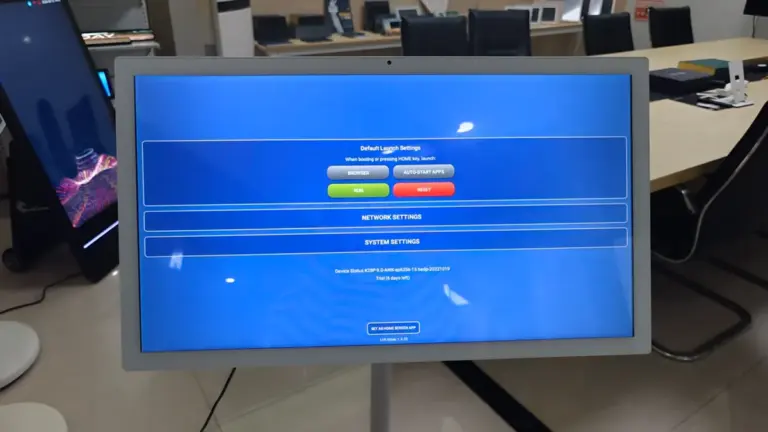
| Kiosk software stack | Your kiosk application in lockdown kiosk mode, plus remote management and OTA updates | Kiosk mode pre-configured at factory, watchdog auto-recovery, update path |
One specification decision deserves early attention: the operating system. Android platforms dominate self-service because kiosk applications are usually app- or web-based, the hardware is cost-efficient, and kiosk-mode lockdown is native. Windows platforms (from fanless boards to Core i-series) are the answer when your software demands it — Windows-only POS suites, or web POS systems that must drive receipt printers, a known weak spot of Android in restaurant environments. Linux suits engineering teams building their own stack. A manufacturer offering all three lets the software choose the platform, rather than the platform dictating your software.
Kiosk Types by Form Factor
Form factor is the first visible decision — it is decided by the floor plan, not the feature list. The commercial market settles into four types:
- Floor-standing kiosks — the flagship format: a full vertical unit with a 21.5 to 32 inch screen at standing height, enclosure structure, and bays for printers, scanners, and payment modules. This is the format for restaurant ordering, retail self-checkout, and lobby check-in. Product lines like the PR2201/PR2701/PR3201 floor-standing kiosks (21.5–32″) show the format’s range, with compact-floor variants like the PR1502/PR2202/PR2402 series for tighter footprints.
- Desktop and countertop kiosks — the same components compressed to counter scale, typically 15.6 to 23.8 inches, for checkouts, reception desks, and service counters where a floor unit would be in the way. The PR1504/PR2204/PR2404 desktop series is a representative example with integrated printer and scanner options.
- Wall-mounted kiosks — screens fixed to walls in corridors and entryways, saving floor space entirely; ideal for check-in, wayfinding, and information lookup. The PR2203 21.5″ wall-mounted kiosk illustrates the type with optional peripheral modules.
- Outdoor and semi-outdoor kiosks — weatherproofed builds with high-brightness (1000+ nits) panels, anti-glare glass, and IP-rated front panels for ticketing and wayfinding at exposed sites. These are a specialized build class — specify them explicitly rather than adapting indoor units.
Browsing by form factor is the fastest way to shortlist: the full range is visible in the self-order and payment kiosk category, where each series lists its sizes, OS options, and peripheral bays.
Where Businesses Deploy Self-Service Kiosks
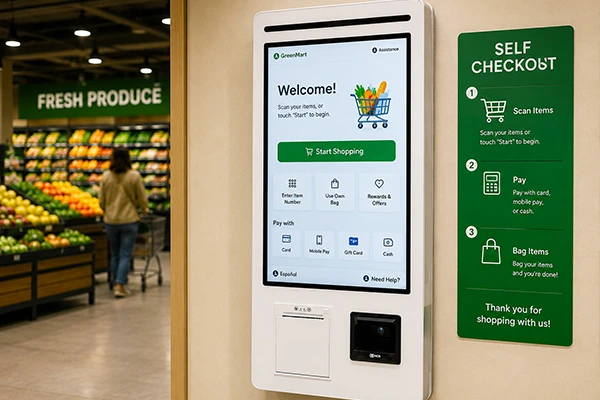
Retail and supermarkets. Self-checkout is the flagship use: customers scan, bag, and pay without waiting for a lane to open, and the store converts peak-hour queues into throughput. Kiosks also carry price checkers, loyalty enrollment, and order-pickup points. Deployment patterns and hardware choices for this environment are covered on the retail and supermarkets applications page.
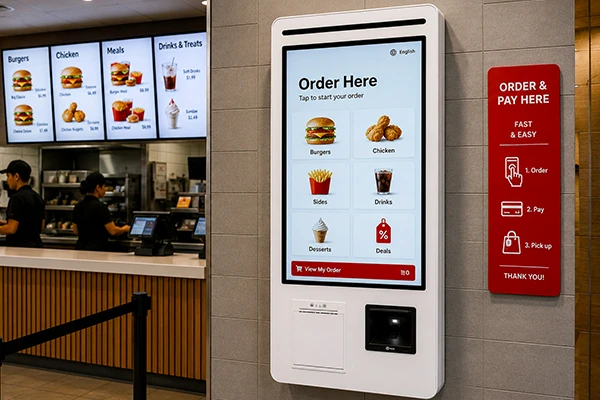
Restaurants and hospitality. Self-ordering kiosks take the full order — menu, modifiers, upsells, payment — freeing counter staff for handoff and service. The economics are well proven in QSR, and the same hardware serves hotel check-in, concierge information, and event ticketing. See the restaurants and hospitality applications page for how these deployments are configured.
Healthcare facilities. Patient check-in, appointment confirmation, queue ticketing, and wayfinding in hospital lobbies reduce reception load and gather accurate patient data at the source. Accessibility — screen height, contrast, font scaling — matters more here than anywhere; the healthcare applications page covers these requirements.
Corporate and public buildings. Visitor registration, meeting-room check-in, employee self-service (HR documents, locker assignment, service requests), and internal information points. These deployments lean on the same kiosk platform as customer-facing ones — an advantage when one IT team manages both — as shown across corporate smart office applications.
The Software Side: Lockdown, Integration and Management
The kiosk’s public-facing software is your application; the professionalism lives in the layers around it. Kiosk mode locks the device to that application — full-screen from boot, no exit to the desktop, no way for the public to wander into system settings. On Android platforms this lockdown is available at the OS level and can be configured at the factory, so units arrive already in deployment state. Watchdog recovery is the unattended-operation guarantee: a hardware mechanism that detects a hung system and force-restarts it automatically, keeping a frozen screen from becoming an all-day outage.
Integration is where B2B kiosk projects succeed or stall. Your kiosk application needs to drive the peripherals — trigger the printer, read the scanner, talk to the payment terminal — and larger deployments need the kiosk fleet managed like software: remote monitoring, content and app updates, and OTA firmware paths. This is the argument for kiosk platforms with documented APIs and SDKs: when the same interface controls peripherals across every model in a fleet, your software is written once and runs everywhere. How Levinko approaches this layer — including model-agnostic peripheral APIs — is documented under software and system integration.
Self-Service Kiosks vs. Staffed Checkout
Kiosks do not replace staffed points — they reallocate them. The pattern across retail and food service is consistent: kiosks absorb the repetitive, standardized transactions (ordering the known menu, paying a bill, checking in for a booked appointment) while staff handle exceptions, service, and complex sales. Businesses that deploy kiosks well move labor from transaction-processing to hospitality and selling, which is where humans outperform screens. The complementary staffed-side hardware — POS terminals and dual-screen setups — is covered in the POS hardware category; most complete deployments run both, on platforms that share peripherals and management.
The practical test is transaction standardization. If a customer journey can be reduced to a guided sequence of choices and a payment, it is kiosk-suitable. If it regularly requires judgment, negotiation, or identity verification beyond a scan, it belongs at a staffed point. Most venues conclude with a mix — and specify kiosk hardware from the same platform family as their POS terminals to keep integration and spares simple.
Planning Your First Kiosk Deployment
A first deployment should be scoped small and specified carefully. Walk the site and decide positions: where queues form, where power and network land, which units need floor-standing presence versus counter or wall placement. Define the complete transaction — every screen, every peripheral action — before ordering hardware, because the peripheral list (printer, scanner, payment, NFC) is what turns a screen into a kiosk. Order pilot units of the exact configuration, run them with your real application and your real customers, and hold the specification fixed when you scale.
Frequently Asked Questions
What is a self-service kiosk in simple terms?
It is a standing touchscreen terminal that lets customers complete a task by themselves — order food, check in, print a ticket, scan and pay — without staff operating the device. Internally it combines a commercial touch display, a computing platform (Android, Windows, or Linux), an enclosure, and transaction peripherals like printers, scanners, and payment modules, running the business’s kiosk application locked to the screen.
What are the main types of self-service kiosks?
Four types cover most deployments: floor-standing kiosks (21.5–32 inch screens on a vertical structure — restaurant ordering, retail checkout, lobby check-in), desktop or countertop kiosks (15.6–23.8 inches for service counters), wall-mounted kiosks (corridors and entryways where floor space is off-limits), and outdoor kiosks (weatherproofed, high-brightness builds for exposed sites). The type follows the location, not the industry.
Should a self-service kiosk run Android or Windows?
Follow your software. Android suits app-based and web-based kiosk applications, with native kiosk-mode lockdown and cost-efficient hardware — it is the default for ordering, check-in, and information kiosks. Windows (from fanless boards to Core i-series) is the answer for Windows-only POS suites or web POS systems that must drive receipt printers, a known Android limitation in restaurant environments. Linux fits engineering teams building their own stack. Choose a platform family that offers all three so the software decides.
What components can be added to a kiosk?
The common additions are transaction peripherals: receipt and ticket printers, QR and barcode scanners, mounts and wiring for payment terminals, NFC/RFID readers for membership or access cards, and cameras where a solution requires them. Connectivity options include dual-band Wi-Fi, Ethernet, and 4G/5G LTE for sites without stable cabling. On industrial-grade platforms, serial interfaces (RS232/RS485) and GPIO allow custom device integration for specialized workflows.
How do kiosks stay running without staff watching them?
Through three software layers: kiosk mode locks the device to your application from boot with no public exit path; a hardware watchdog monitors the system and force-restarts it automatically if the application or OS hangs — on Levinko platforms within roughly 50 seconds; and remote management with OTA update paths lets your team monitor the fleet and push fixes without visiting each site. Commercial hardware completes the picture with 24/7-rated components and mandatory factory burn-in testing before shipment.